Anchor's Reactivity Model: Fine-Grained State Management
Anchor's reactivity system is built on a fine-grained observation model that enables efficient state management with minimal overhead. This document explains the core concepts of Anchor's reactivity: Observation, Subscription, and History Tracking.
Observation
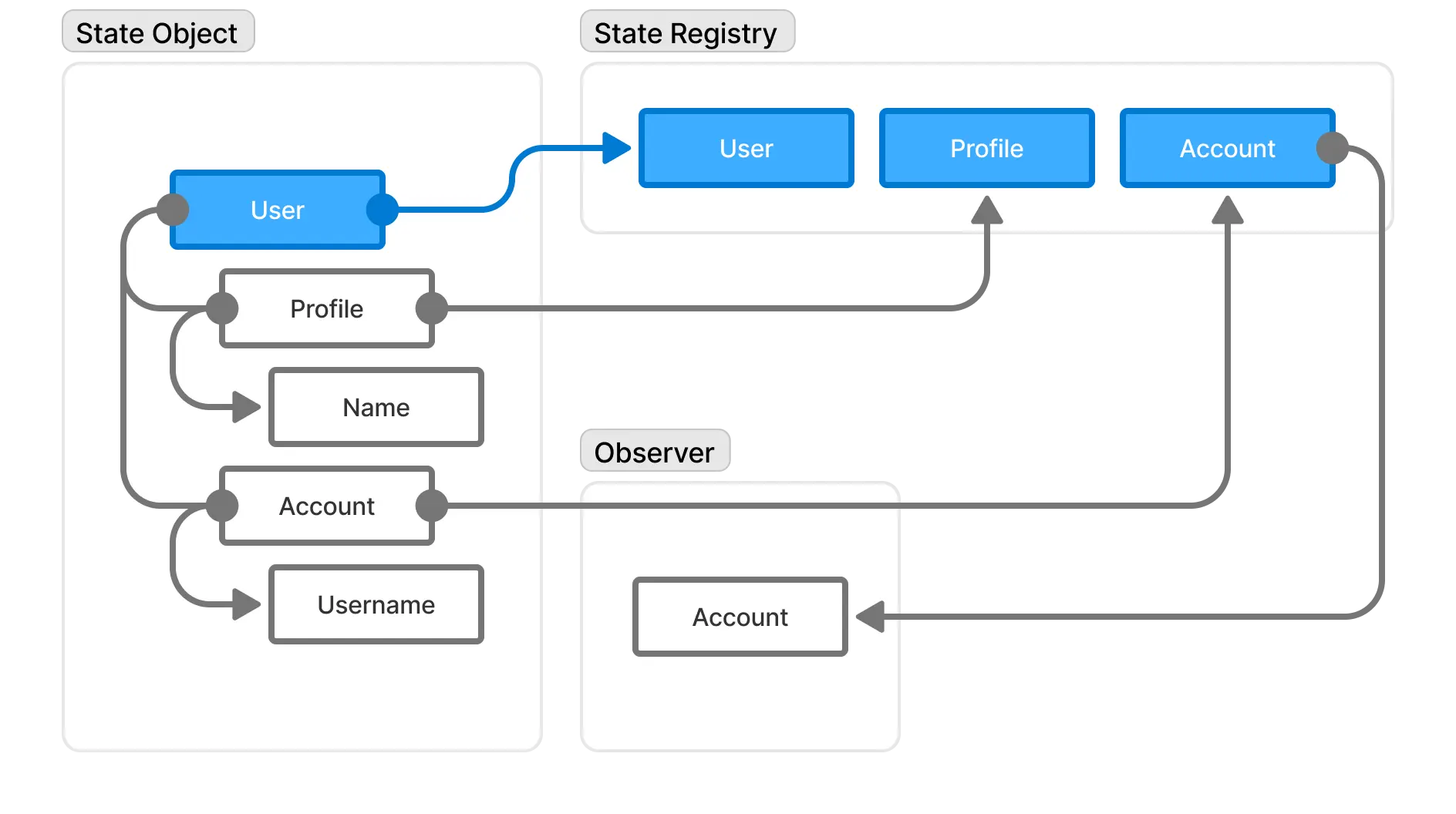
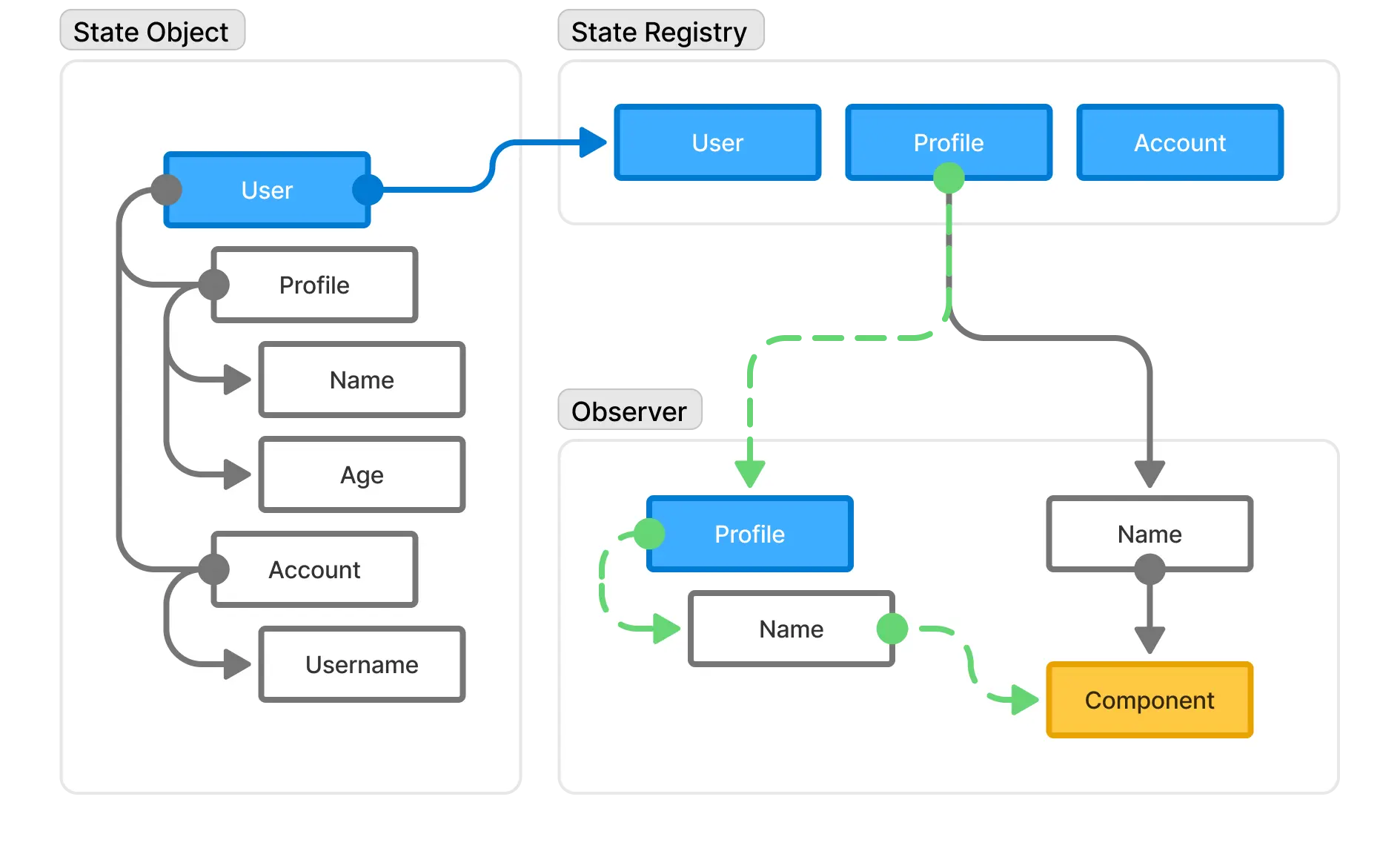
Observation is the foundation of Anchor's fine-grained reactivity. It maintains direct connections between specific pieces of state and their observers (components or functions). When a piece of state changes, only the observers that directly depend on that state are notified.
How Observation Works in Anchor
When you access a property of a reactive state object within an observer context, Anchor automatically tracks this dependency. Later, when that property is modified, only the relevant observers are re-executed.
import { anchor, createObserver, withinObserver } from '@anchorlib/core';

const user = anchor({
  profile: {
    name: 'John',
    age: 30,
  },
});

// Creating an observer that will be used for state observation
const observer = createObserver((change) => {
  console.log('State changed:', change);
});

// Within this observer context, accessing state.user.name creates a dependency
const name = withinObserver(observer, () => {
  return user.profile.name; // This creates a tracked dependency
});

console.log(name); // This will log the name

// Later, when we update the tracked property:
user.profile.name = 'Jane'; // This will trigger the observer callback
Observation Shortcut
You can also use the observer.run method instead of withinObserver. For Example:
observer.run(() => {
  console.log(state.profile.name);
});
Key Benefits of Anchor's Observation System
- Efficiency: Only relevant observers are notified of changes
- Automatic Dependency Tracking: Dependencies are tracked automatically when accessed within an observer context
- Dynamic Dependencies: Dependencies can change based on code execution paths
Clean Up
When you create an observer, you need to clean up after yourself after it's no longer needed to avoid memory leaks. This is done by calling the observer.destroy() method. While internally it uses weak references allowing GC to collect them, it's always good practice to clean up early.
Bypassing Observation
Sometimes, you may want to bypass observation of some state properties within an observation context to prevent some property to being tracked. To bypass observation, you can use the outsideObserver method.
Bypass Sample
import { anchor, createObserver, withinObserver, outsideObserver } from '@anchorlib/core';

const state = anchor({
  profile: {
    name: 'John',
    age: 30,
    settings: {
      darkMode: true,
    },
  },
});

const observer = createObserver((change) => {
  console.log('State changed:', change);
});

const user = withinObserver(observer, () => {
  const name = state.profile.name; // This will be tracked
  const age = outsideObserver(() => state.profile.age); // Bypass tracking of age as you don't expect age to change

  return { name, age };
});

user.name = 'Jane'; // This will trigger the observer callback
user.age = 40; // This will not trigger the observer callback (accessed with bypass)
user.settings.darkMode = false; // This will not trigger the observer callback (not accessed during observation)
Observation APIs
Anchor provides a set of APIs for observing state changes. Please refer to the API Reference section for more details:
- Anchor Core Observation APIs - Core APIs for creating and managing observers.
- Anchor for React Observation APIs - Reactivity APIs for creating and managing observers.
- Anchor for Svelte Observation APIs - Svelte reactivity APIs for creating and managing observers.
- Anchor for Vue Observation APIs - Vue reactivity APIs for creating and managing observers.
Subscription
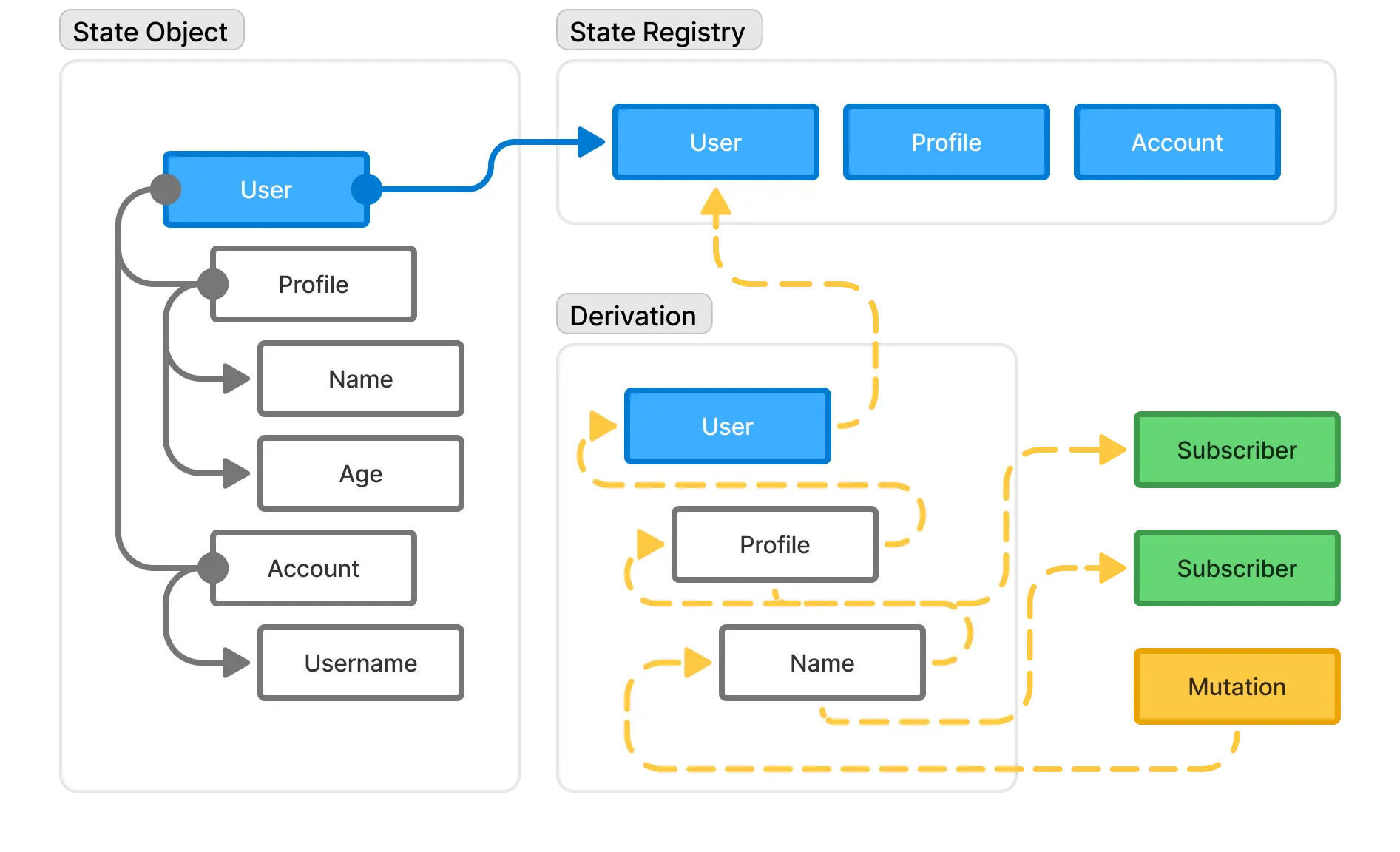
While Observation handles fine-grained reactivity at the property level, Subscription provides a mechanism for creating reactions to state changes at a higher level, recursively. This means that when a state changes at the deeper level, the higher-level subscription is also gets notified.
Use Cases
Subscription is useful when you want to work with state regardless of which props that are used such as mirroring state or binding to another source. You have full control of what you want to do with each change.
Basic Subscription Usage
Subscription is a powerful mechanism for creating reactions to state changes. It allows you to create a higher-level reaction to state changes.
import { anchor, subscribe } from '@anchorlib/core';

const state = anchor({
  count: 0,
});

// Subscribe to state changes
const unsubscribe = subscribe(state, (current, event) => {
  console.log('Current state:', current, event);
});

// Update the state
state.count++; // This will trigger the subscription callback

// Unsubscribe when no longer needed
unsubscribe();
Snapshot Understanding
The object passed to the callback IS NOT a snapshot. It's the underlying state object to give you raw performance access to the state data without going through the traps. It's important to be cautious when using the object passed to the callback, since mutating it can lead to unexpected behavior.
Callback Invocation
The given callback will be executed not just when a state changes, but also during the registration. This means that the callback will be invoked with the initial state snapshot with initial event.
Piping Changes
You can pipe changes from one state to another, optionally transforming the data:
Piping Sample
import { anchor, subscribe } from '@anchorlib/core';

const source = anchor({ count: 0 });
const target = anchor({ value: 0 });

// Pipe changes from source to target
subscribe.pipe(source, target, (snapshot) => ({
  value: snapshot.count * 2,
}));

source.count = 5; // This will update target.value to 10
Subscription & Derivation APIs
Anchor provides a set of APIs for deriving state changes. Please refer to the API Reference section for more details:
- Anchor Core Subscription APIs
- Anchor for React Derivation APIs
- Anchor for Svelte Derivation APIs
- Anchor for Vue Derivation APIs
History Tracking
Anchor provides built-in history tracking that enables undo/redo functionality with minimal setup.
Basic History Usage
import { anchor, history } from '@anchorlib/core';

const state = anchor({
  todos: [{ id: 1, text: 'Learn Anchor', done: false }],
  filter: 'all',
});

// Enable history tracking
const historyState = history(state, {
  maxHistory: 50, // Keep up to 50 history states
  debounce: 200, // Debounce changes by 200ms
});

// Now you can undo/redo changes
state.todos.push({ id: 2, text: 'Build an app', done: false });
state.todos[0].done = true;

// Undo the last change
historyState.backward();

// Redo the change
historyState.forward();

// Check if you can undo/redo
if (historyState.canBackward) {
  console.log('Can undo');
}

if (historyState.canForward) {
  console.log('Can redo');
}
FYI
The returned object from history is an Anchor (reactive) state. This means you can use it like any other reactive state such subscribing to it or observing it. The difference is, history state is not recursive. You only get notified for changes related to the history data.
Undoable Operations
In addition to the history tracking system, Anchor provides an undoable function that allows you to create operations that can be undone immediately without setting up a full history tracker.
This is useful for cases where you want to perform a set of operations and potentially revert them, without keeping a long-term history. The undoable function executes the operation immediately and returns an undo function that can be called to revert the changes.
import { anchor, undoable } from '@anchorlib/core';

const state = anchor({ count: 0, name: 'John' });

// Create an undoable operation
const [undo] = undoable(() => {
  state.count = 1;
  state.name = 'Jane';
});

// State is now { count: 1, name: 'Jane' }

// Undo the changes
undo();
// State is now { count: 0, name: 'John' }
History APIs
Anchor provides a set of APIs for managing history:
Best Practices
- Minimize Observer Scope: Keep observer contexts as small as possible.
- Use Derivation for Computed Values: Use derivation for computed values if possible, as it gives you raw performance by bypassing the traps.
- Batch Changes: When making multiple changes, consider batching them (
anchor.assign()) to reduce notifications. - Clean Up Observers: Always clean up observers when they're no longer needed to prevent memory leaks.
- Avoid Mutating The Underlying State Object Directly: Mutating the underlying state object directly can lead to unexpected behavior.
- Don't Mutate Events: Don't mutate events passed to observers, subscribers, or histories. Events are the source of truth. Mutating it can lead to unexpected behavior. We can make event immutable, but we don't want to add another overhead for this.